

Protect Your Privacy on Telegram Web: Blur Messages, Media, and User Details with Full Control
What is a Telegram Web Privacy Extension?
A Telegram Web Privacy Extension is a browser tool that lets you blur sensitive content on Telegram Web so onlookers cannot see your messages, media, or contact details. Instead of exposing your chats on screen, the extension obscures everything until you hover over it to reveal it. This gives you full control over what is visible and when, whether you are working from a café, a co-working space, an open office, or sharing your screen on a call.
The Telegram Blur Extension covers messages, media previews, profile pictures, usernames, group names, and the last message preview in your chat list. You can blur individual elements or toggle everything off at once. No data is tracked, stored, or transmitted. It runs entirely inside your browser without affecting Telegram Web’s speed or performance.
Telegram Web does not have built-in screen privacy controls. Regular Telegram chats are encrypted in transit but stored on Telegram’s servers, meaning the content is visible on your screen to anyone nearby. Secret chats use end-to-end encryption and stay only on participating devices, but even those are visible on screen. The Telegram Web Privacy Extension adds a visual privacy layer on top of everything, making it the only tool that protects what people around you can see in real time.
How to use Telegram Web Privacy Extension?
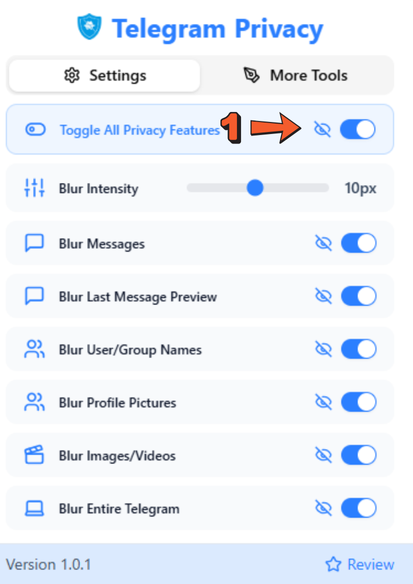

Step 1: Switch On Privacy Settings
Install the Telegram Web Privacy Extension from the Chrome Web Store and open Telegram Web. Click the extension icon in your Chrome toolbar to open the control panel. Click “Toggle All Privacy Features” to blur every element on screen instantly with one click.
Step 2: Customise What You Blur
If you do not need full-screen blur, customize individual elements. Choose from Blur Messages, Blur Last Message Preview, Blur User and Group Names, Blur Profile Pictures, and Blur Images and Videos. Enable only the elements that matter for your current environment.
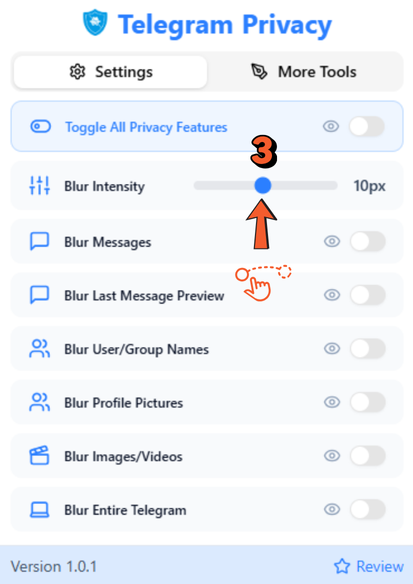
Step 3: Set Your Blur Strength
Use the intensity slider to control how strong the blur effect is. Set it low for a subtle obscuring effect in semi-private spaces or push it to maximum for complete obfuscation in crowded public environments. The setting saves automatically so you do not need to reconfigure it every session.
Why Choose Telegram Web Privacy Extension?
1] Complete Content Control
Blur messages, media, usernames, and previews on Telegram Web to keep sensitive content hidden from onlookers. Ideal for public or shared environments where screen exposure is a constant risk.
2] Custom Privacy Settings
Choose exactly what you want to blur from chat messages to profile pictures, or use the Toggle All switch for instant full-screen privacy without touching individual settings.
3] Hover-to-Reveal Feature
Blurred content stays hidden until you hover over it. You control when and what to reveal, which is ideal for professionals handling confidential chats, presentations, or desk collaborations.
4] Seamless Integration
The extension works inside Telegram Web without affecting performance, speed, or your normal workflow. It adds privacy without adding friction.
5] 100% Safety
No tracking, no data harvesting. The extension does not transmit or store any personal information. It runs locally in your browser on Telegram Web only.
6] Built For Everyone
Whether you are a student, remote worker, content creator, or business professional, the Telegram Privacy Extension fits into any privacy-first routine without a learning curve.
Smart Tips to Use Telegram Web Privacy Extension
A few habits make the Telegram Web Privacy Extension significantly more effective in daily use:
1] Toggle All for instant privacy before any screen share
Before joining a call or mirroring your screen, click Toggle All to blur every element on Telegram Web in one click. Do not rely on remembering to close the tab.
2] Set blur strength to maximum in crowded public spaces
The intensity slider matters more than most users realize. A low-strength blur is still readable at close range. In airports, trains, or open offices, push the slider to full strength so even nearby screens cannot make out the content.
3] Pair it with Telegram Secret Chats for deeper privacy
The Telegram Privacy Extension handles screen visibility. For messages you also want end-to-end encrypted at the server level, use Telegram Secret Chats. Together, they cover both screen exposure and data-level privacy.
4] Use it during screen recordings and tutorials
If you create tutorial content or record your screen for work, blur your Telegram Web interface before recording to avoid accidentally exposing contact names, message content, or media in the video.
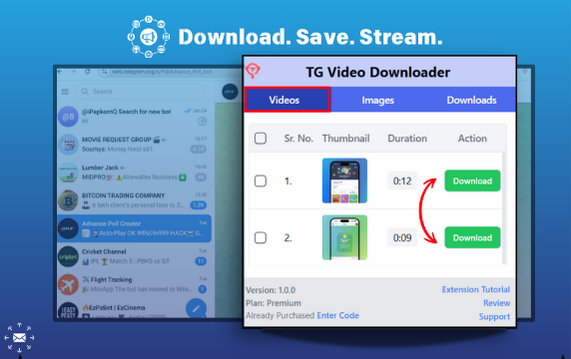
2 Best Chrome Extensions for Telegram Web

FAQs
What is the Telegram Web Privacy Extension?
The Telegram Privacy Extension is a Chrome browser tool that blurs messages, media previews, profile pictures, usernames, and other sensitive content on Telegram Web. Content stays blurred until you hover over it, keeping your chats private from anyone near your screen. It does not track, store, or transmit any personal data.
How do I install the Telegram Web Privacy Extension?
Open the Chrome Web Store, search for Telegram Privacy Extension, and click Add to Chrome. Once installed, pin the icon to your toolbar, open Telegram Web, and click Toggle All to activate privacy instantly.
Can I choose what gets blurred?
Telegram Web Translator supports 100+ languages including Spanish, French, German, Arabic, Russian, Portuguese, Hindi, Indonesian, Swahili, Japanese, Korean, Chinese (Simplified and Traditional), and many more. Auto-detect identifies the incoming language so you do not need to set it manually.
Does the Telegram Web Privacy Extension affect Telegram Web's performance?
No. The extension runs inside your browser without interfering with Telegram Web’s speed or functionality. You can send messages, receive notifications, and use all features normally while blur is active.
Is the Telegram Web Privacy Extension safe?
Yes. The extension does not track activity, harvest data, or transmit any information. It operates entirely within your browser and only applies visual blur to the Telegram Web interface. No personal content is accessed or stored.