

The Best Telegram Web Translator: Translate Messages Instantly!
What is Telegram Message Translation?
Telegram message translation is the ability to convert messages you send or receive on Telegram into your preferred language, instantly, without leaving the chat. Telegram is used by millions of people across 190+ countries, which means conversations often happen in Arabic, Spanish, Russian, Portuguese, German, and dozens of other languages. Without a translator, you miss context, misread tone, and waste time switching between apps.
With Telegram Web Translator, you can translate Telegram messages easily on Telegram Web from your desktop or laptop. The extension works directly inside your browser, so there is no copy-pasting, no tab-switching, and no delay. Every incoming message gets translated in real time, and every reply you type goes out in the right language.
When messages arrive in a language you do not speak, you may run into:
- Missing critical details in international group chats
- Difficulty replying without accidentally sending the wrong language
- Wasting time copying text into Google Translate and switching back
- Misunderstandings that damage professional or personal relationships
- No way to keep up in fast-moving multilingual group conversations
Telegram Web Translator fixes all of this by letting you translate Telegram messages easily with one click.
How to Translate Telegram Messages Using Telegram Web Translator in 2 Steps?

Step 1: Install the Telegram Translator Extension
Add the Telegram Translator Extension from the Chrome Web Store and pin it to your browser for quick access.
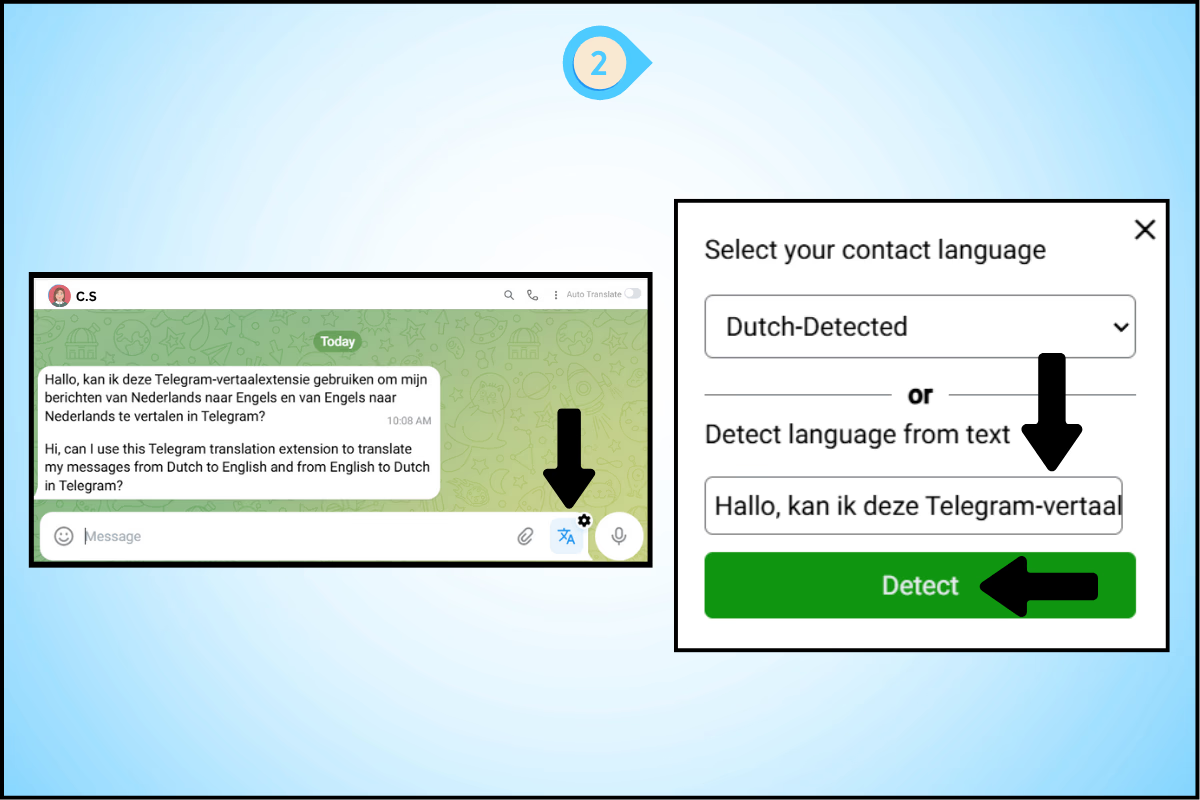
Step 2: Detect Any Language
Paste the message. The Telegram translator will automatically detect the language for you.
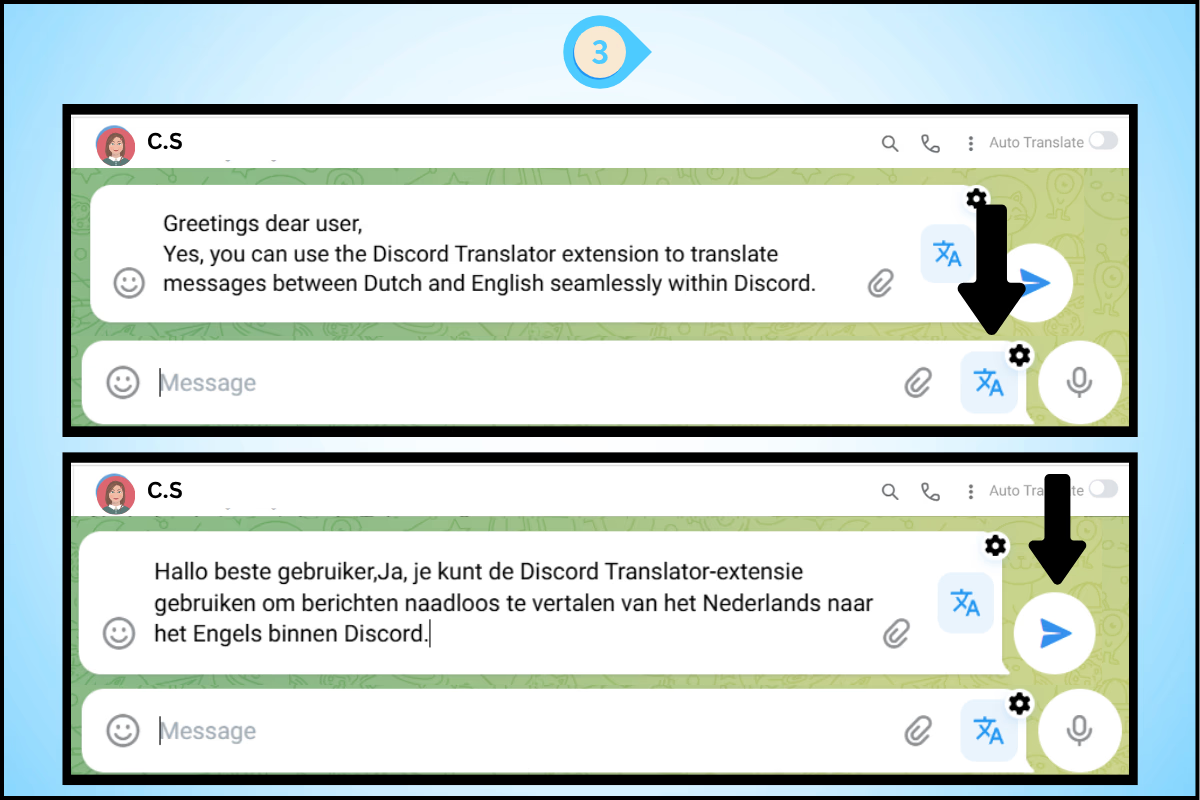
Step 3: Reply in the Same Language
Type your response. The translator for Telegram will accurately convert your reply before sending.
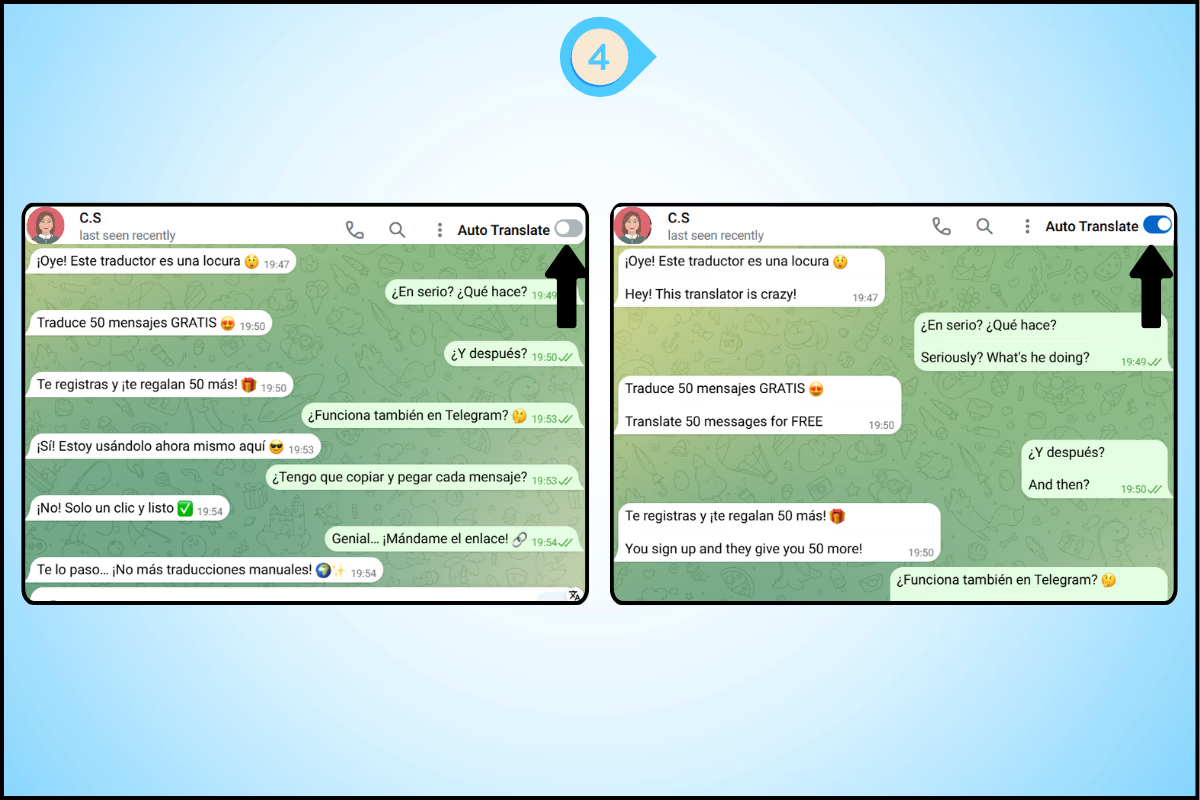
Step 4: Auto-Translate Entire Chat
Turn on auto translate for Telegram. Your messages will be translated in real-time as you type, allowing fast and efficient multilingual Telegram chats.
Smart Tips to Translate Telegram Messages Easily Using Telegram Web Translator
1. Pin Telegram Web Translator to your Chrome toolbar
Keep the extension icon visible at all times so you can trigger a translation with one click, even mid-conversation.
2. Use Auto-Translate for group chats
Group chats move fast. Relying on manual one-click translation in a busy group means you will always be behind. Turn on auto-translate for groups and read every message as it arrives.
3. Use Detect Language for unknown scripts
If a message arrives in a script you cannot identify (Cyrillic, Arabic, Thai, Chinese), use the detect feature first. It confirms the language before translating so you get the right output.
4. Use it for Telegram channels
If you follow international Telegram channels for news, research, or business intelligence, Telegram Web Translator translates channel posts as well, not just private chats.
How Long Does Telegram Message Translation Take?
With Telegram Web Translator, translation is near-instant. A standard chat message translates in under one second. Longer messages (50+ words) typically translate in 1-2 seconds. Auto-translate processes incoming messages as they arrive, so there is no visible delay in normal chat speed.
Translation accuracy is high across major languages including Spanish, Portuguese, French, German, Arabic, Russian, Hindi, Indonesian, Korean, Japanese, Chinese (Simplified and Traditional), and 90+ others. Rare or regional dialects may show slightly lower accuracy.
2 Best Chrome Extensions for Telegram Web


FAQs
How do I translate Telegram messages on desktop?
Install the Telegram Web Translator Chrome extension from the Chrome Web Store. Open Telegram Web (web.telegram.org) in Chrome. Click the Telegram Web Translator icon when you receive a message in a foreign language, and the translation appears instantly. For ongoing chats, enable auto-translate so every incoming message converts automatically.
Can I translate messages I send on Telegram?
Yes. Telegram Web Translator lets you type a message in your own language, select the recipient’s language, and translate before sending. The translated text replaces your original message in the Telegram chat box so you send in the right language every time.
How many languages does Telegram Web Translator support for Telegram?
Telegram Web Translator supports 100+ languages including Spanish, French, German, Arabic, Russian, Portuguese, Hindi, Indonesian, Swahili, Japanese, Korean, Chinese (Simplified and Traditional), and many more. Auto-detect identifies the incoming language so you do not need to set it manually.
Does Telegram Web Translator work with Telegram group chats?
Yes. Telegram Web Translator works across all Telegram Web conversations including private chats, group chats, and channels. Auto-translate is especially useful in group chats where messages from multiple senders in different languages arrive quickly.
Is Telegram Web Translator free to use for translating Telegram messages?
Telegram Web Translator can be added to Chrome for free. Open the Chrome Web Store, search for Telegram Web Translator, and click Add to Chrome.
Why is my Telegram banned without reason?
Before you appeal your ban, check our Avoid Telegram Ban guide and enable anti-ban settings in the Telegram Bulk Message Sender Chrome Extension to safeguard your account.
Telegram may ban your number without a clear reason for any of the following:
Violation of Terms of Service
Your account or another tied to your phone number or email may have shared prohibited content or breached Telegram’s rules.Spamming or mass messaging
Sending unsolicited messages too quickly or in high volume can trigger automated spam filters even if recipients did not report you.Linked account issues
A ban on another account using the same device, IP address or recovery email can carry over to your number.Bot or automation misuse
Running scripts or bots that violate Telegram’s API policies such as bulk forwarding without consent can provoke a ban.
Steps to lock in anti-ban protection
Step 1: Install the Telegram Bulk Message Sender Chrome Extension
Step 2: Open Telegram Web and sign in
Step 3: Upload your contacts via Excel or manual entry
Step 4: Compose your messages with personalization variables
Step 5: Configure time gaps, timestamp tags and smart pauses then click Send or schedule
Key features for uninterrupted messaging
Time gap settings that mimic human pacing
Unique timestamp tags on every message
Smart delay algorithms to respect Telegram’s rate limits
Real-time delivery reports so you can pause if issues arise
Scheduling and queuing for planned campaigns
Does translating Telegram messages require an internet connection?
Yes. Telegram Web Translator uses cloud-based translation to deliver accurate results across 100+ languages. An active internet connection is required for translation to work.